Documentation Documentation Dokumentation Documentación Documentação
Setup and usage guide Guide de configuration et d’utilisation Einrichtungs- und Nutzungsanleitung Guía de configuración y uso Guia de configuração e uso
Set up Lemonize on your Mac, add Pocket on iPhone or iPad, then capture, share and send each note to its destination. Configurez Lemonize sur votre Mac, ajoutez Pocket sur iPhone ou iPad, puis capturez, partagez et envoyez chaque note vers sa destination. Richte Lemonize auf deinem Mac ein, füge Pocket auf iPhone oder iPad hinzu und erfasse, teile und sende jede Notiz an ihr Ziel. Configura Lemonize en tu Mac, añade Pocket en iPhone o iPad y captura, comparte y envía cada nota a su destino. Configure o Lemonize no Mac, adicione o Pocket no iPhone ou iPad e capture, compartilhe e envie cada nota ao destino.
Use Lemonize Pocket Utiliser Lemonize Pocket Lemonize Pocket verwenden Usar Lemonize Pocket Usar o Lemonize Pocket
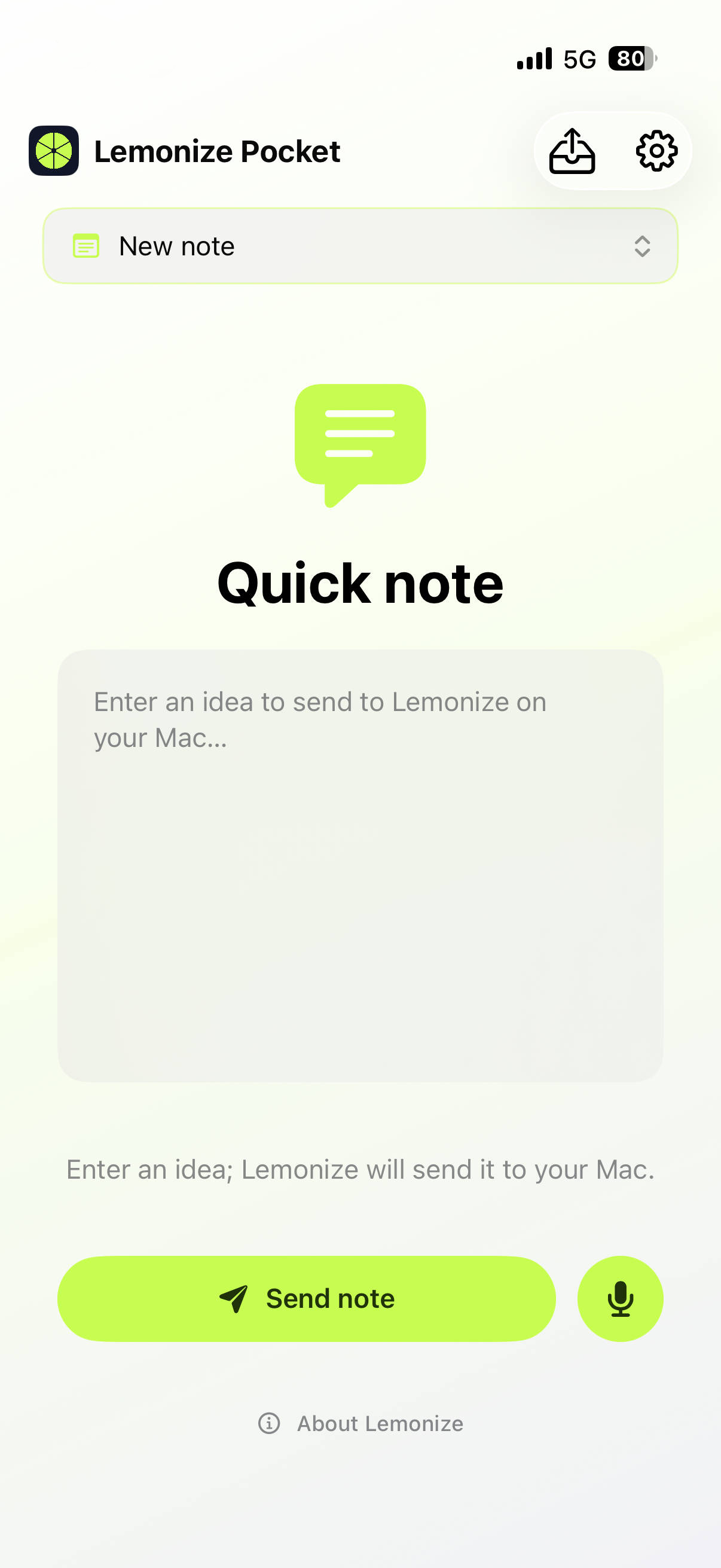
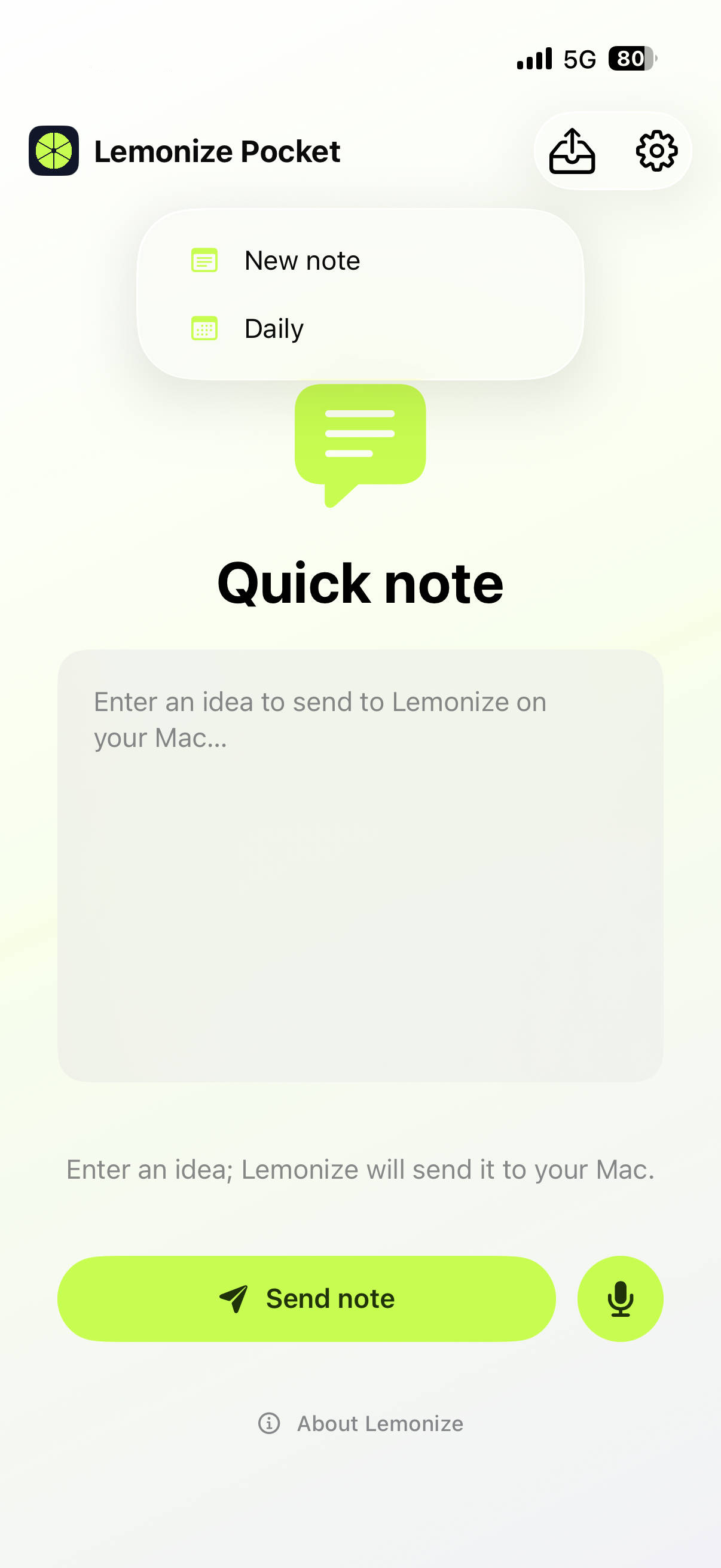
Lemonize Pocket is the iOS and iPadOS companion for moments when your Mac is not in front of you. It uses the mode catalogue published by the Mac app, so mobile capture stays simple while the Mac remains responsible for the final destination. The selected mode appears in a prominent full-width menu in Quick Text, Quick Voice and the Share Extension.Lemonize Pocket est le compagnon iOS et iPadOS pour les moments où votre Mac n’est pas devant vous. Il utilise le catalogue de modes publié par l’app Mac : la capture mobile reste simple et le Mac reste responsable de la destination finale. Le mode choisi apparaît dans un menu pleine largeur bien visible dans Quick Text, Quick Voice et l’extension de partage.Lemonize Pocket ist der iOS- und iPadOS-Begleiter für Momente ohne Mac vor dir. Die App nutzt den vom Mac veröffentlichten Moduskatalog, damit die mobile Erfassung einfach bleibt und der Mac das endgültige Ziel übernimmt. Der ausgewählte Modus erscheint in Quick Text, Quick Voice und der Teilen-Erweiterung in einem gut sichtbaren Menü über die volle Breite.Lemonize Pocket es el compañero para iOS y iPadOS cuando no tienes el Mac delante. Usa el catálogo de modos publicado por el Mac, así la captura móvil sigue siendo sencilla y el Mac se encarga del destino final. El modo seleccionado aparece en un menú visible a todo lo ancho en Quick Text, Quick Voice y la extensión de compartir.O Lemonize Pocket é o companheiro para iOS e iPadOS quando o Mac não está à sua frente. Ele usa o catálogo de modos publicado pelo Mac, mantendo a captura móvel simples e deixando o destino final para o Mac. O modo selecionado aparece em um menu destacado de largura total no Quick Text, no Quick Voice e na extensão de compartilhamento.
Quick Text
Open Pocket, choose Quick Text, select a mode and type the idea. The text is saved on the device immediately. Send it automatically or from the Outbox; you can edit a text capture while it is still local or waiting to reach the Mac.Ouvrez Pocket, choisissez Quick Text, sélectionnez un mode et écrivez votre idée. Le texte est immédiatement enregistré sur l’appareil. Envoyez-le automatiquement ou depuis la Boîte d’envoi ; vous pouvez modifier une capture texte tant qu’elle est locale ou en attente du Mac.Öffne Pocket, wähle Quick Text, einen Modus und schreibe deine Idee. Der Text wird sofort lokal gespeichert. Sende automatisch oder aus der Ausgangsbox; lokale oder wartende Text-Erfassungen können bearbeitet werden.Abre Pocket, elige Quick Text, selecciona un modo y escribe la idea. El texto se guarda inmediatamente en el dispositivo. Envíalo automáticamente o desde la bandeja de salida; puedes editarlo mientras sea local o espere al Mac.Abra o Pocket, escolha Quick Text, selecione um modo e escreva a ideia. O texto é salvo imediatamente no dispositivo. Envie automaticamente ou pela Caixa de saída; uma captura de texto pode ser editada enquanto estiver local ou aguardando o Mac.
Quick Voice
Choose Quick Voice, allow microphone access, select a mode and record. Pocket stores an AAC memo locally first, shows the sending state, and uploads it without waiting for transcription. The Mac validates the audio, transcribes it locally when supported, and processes the result like any other capture.Choisissez Quick Voice, autorisez le microphone, sélectionnez un mode et enregistrez. Pocket conserve d’abord un mémo AAC local, affiche son état d’envoi et le téléverse sans attendre la transcription. Le Mac valide l’audio, le transcrit localement si la fonction est disponible et le traite comme toute autre capture.Wähle Quick Voice, erlaube den Mikrofonzugriff, wähle einen Modus und nimm auf. Pocket speichert zuerst ein AAC-Memo lokal und lädt es hoch, ohne auf die Transkription zu warten. Der Mac prüft das Audio, transkribiert es lokal, wenn unterstützt, und verarbeitet es wie jede andere Erfassung.Elige Quick Voice, permite el micrófono, selecciona un modo y graba. Pocket guarda primero un memo AAC local y lo sube sin esperar a la transcripción. El Mac valida el audio, lo transcribe localmente cuando es compatible y procesa el resultado como cualquier captura.Escolha Quick Voice, permita o microfone, selecione um modo e grave. O Pocket salva primeiro um memo AAC local e o envia sem esperar pela transcrição. O Mac valida o áudio, transcreve localmente quando compatível e processa o resultado como qualquer captura.
Outbox, status and retryBoîte d’envoi, état et relanceAusgangsbox, Status und WiederholungBandeja de salida, estado y reintentoCaixa de saída, status e nova tentativa
The Outbox shows local, sending, sent, processed and failed captures. A local or failed capture can be retried, edited when it is text, or deleted with confirmation. Once a capture has reached the Mac, its terminal status stays visible while the devices synchronize.La Boîte d’envoi affiche les captures locales, en cours d’envoi, envoyées, traitées et en erreur. Une capture locale ou en erreur peut être relancée, modifiée s’il s’agit d’un texte, ou supprimée après confirmation. Une fois arrivée sur le Mac, son état final reste visible pendant la synchronisation des appareils.Die Ausgangsbox zeigt lokale, gesendete, verarbeitete und fehlgeschlagene Erfassungen. Lokale oder fehlerhafte Erfassungen können wiederholt, als Text bearbeitet oder nach Bestätigung gelöscht werden. Nach dem Eintreffen auf dem Mac bleibt der Endstatus sichtbar.La bandeja muestra capturas locales, enviadas, procesadas y fallidas. Una captura local o fallida se puede reintentar, editar si es texto o borrar con confirmación. Cuando llega al Mac, su estado final sigue visible durante la sincronización.A Caixa de saída mostra capturas locais, enviadas, processadas e com erro. Uma captura local ou com erro pode ser reenviada, editada se for texto ou excluída com confirmação. Depois que chega ao Mac, o status final continua visível durante a sincronização.
Widgets and iPadWidgets et iPadWidgets und iPadWidgets y iPadWidgets e iPad
On supported iOS/iPadOS versions, Quick Voice can be started or stopped from the Lemonize widget, Control Center control or Live Activity. On iPad, Quick Text also supports Command-Return with a hardware keyboard.Sur les versions iOS/iPadOS compatibles, Quick Voice peut être démarré ou arrêté depuis le widget Lemonize, le contrôle du Centre de contrôle ou la Live Activity. Sur iPad, Quick Text accepte aussi Commande-Entrée avec un clavier matériel.Auf unterstützten iOS-/iPadOS-Versionen lässt sich Quick Voice über Widget, Kontrollzentrum oder Live Activity starten und stoppen. Auf dem iPad unterstützt Quick Text außerdem Befehl-Eingabe mit einer Hardware-Tastatur.En versiones compatibles de iOS/iPadOS, Quick Voice se puede iniciar o detener desde el widget, el control del Centro de control o la Live Activity. En iPad, Quick Text también admite Comando-Retorno con teclado físico.Nas versões compatíveis do iOS/iPadOS, o Quick Voice pode ser iniciado ou encerrado pelo widget, controle da Central de Controle ou Live Activity. No iPad, o Quick Text também aceita Command-Return com teclado físico.